Choose Rest at the save-point menu
Return to a blue-crystal save point, interact with it, and select Rest. Steam Demo players report that this restores your health fully. Choosing Save is a separate menu action; use Rest when your immediate task is healing.
On this page
Find a blue crystal
The opening rest point is just beyond the camp's crossed-board exit. Look left after clearing the boards for the monument topped by a blue crystal. If you need the approach landmarks, follow the illustrated route to the first rest point.
Interact with the monument to open its location menu. In the opening area, the menu reads “Knight's Encampment / Isle of Neasied.”
Select Rest, then check your health
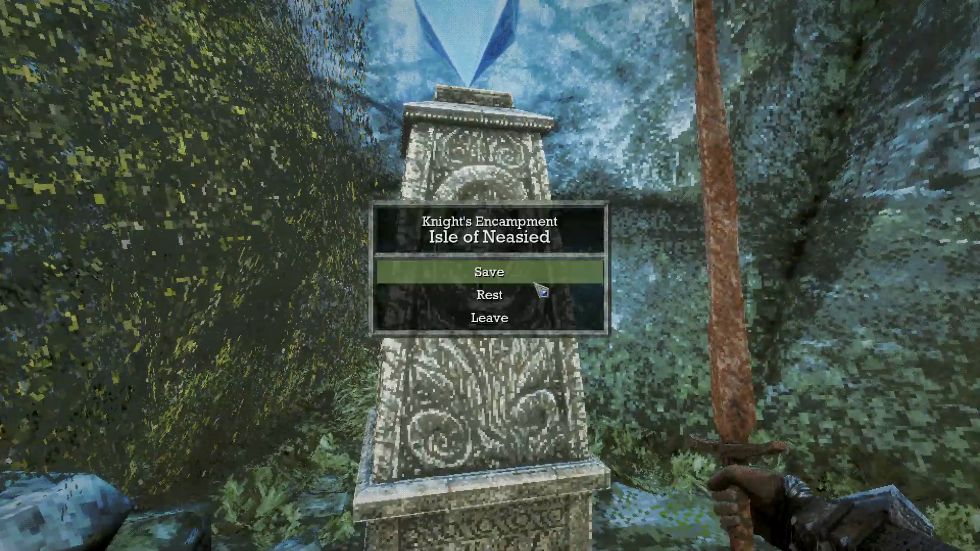
- Open the blue-crystal menu.
- Choose Rest, rather than only saving.
- After resting, check that your health has recovered before continuing.
The recovery advice comes from a February 2026 player question about running out of medicine. The menu above shows where to perform that action.
Save and Rest have different jobs
Save is the option to select when you want to save your progress. Rest is the recovery action. Do not rely on this guide as confirmation that Rest also saves automatically.
Rest can also bring defeated enemies back, according to Demo player discussions about the two options. Be ready to encounter them again on your way out. That makes “I only want to save” a different choice from “I need to heal.”
Recover health; expect enemies to return.
Choose the separate saving option.
Continue with a plan
If fights quickly use up your recovered health, check the attack rhythm and full-bar combat basics before going back in. The opening route also shows the Dagger Belt at the island wreck if you want to find that early pickup.